During the course of doing data analysis and modeling, a significant amount of time is spent on data preparation: loading, cleaning, transforming, and rearranging. Such tasks are often reported to take up 80% or more of an analyst’s time.
All of the above can be completed with a small number of functions from the dplyr package.
The dplyr verbs
Functions for rows:
arrange()
filter()
distinct()
Functions for columns:
relocate()
select()
rename()
mutate()
The dplyr verbs have functional names
arrange() and relocate() change the order of rows and columns.
filter() and select() keep or remove rows and columns.
distinct() returns only unique rows (removes duplicates).
rename() changes the name of a column.
mutate() creates a new variable based on one or more other columns.
Arranging the order
The arrange() function (for rows) and the relocate() function (for columns) allow us to re-order our data.
Note
Rows and columns are not just different axis. Columns have a particular type (numeric, character, time), row are observations that combine different types of data.
arrange() the rows
Start by looking at our data:
penguins |>head()
  species    island bill_len bill_dep flipper_len body_mass    sex year
1  Adelie Torgersen     39.1     18.7         181      3750   male 2007
2  Adelie Torgersen     39.5     17.4         186      3800 female 2007
3  Adelie Torgersen     40.3     18.0         195      3250 female 2007
4  Adelie Torgersen       NA       NA          NA        NA   <NA> 2007
5  Adelie Torgersen     36.7     19.3         193      3450 female 2007
6  Adelie Torgersen     39.3     20.6         190      3650   male 2007
  species island bill_len bill_dep flipper_len body_mass  sex year
1  Gentoo Biscoe     48.8     16.2         222      6000 male 2009
2  Gentoo Biscoe     49.8     15.9         229      5950 male 2009
3  Gentoo Biscoe     55.1     16.0         230      5850 male 2009
4  Gentoo Biscoe     50.4     15.7         222      5750 male 2009
5  Gentoo Biscoe     49.5     16.1         224      5650 male 2009
6  Gentoo Biscoe     50.8     17.3         228      5600 male 2009
Combining arguments within the arrange() function can be used for splitting ties (e.g., when you have samples with year, month and date recorded).
Note
You can apply desc() to any number of arguments within arrange(), but you must apply desc() to each variable individually.
Practical uses with arrange()
count() plus arrange() is one way to view the frequency of data.
Exercise: pipe penguins to count(), choosing a single variable to include inside count(), then pipe to arrange().
Solution: penguins |> count(island) |> arrange(n)
Why n? Look at the result of penguins |> count(island) and check the variable names.
relocate() the columns
Change the order of columns with relocate().
relocate() takes a column name and moves it to another position in the dataset, defaulting to moving the specified column to the start (left) of the dataset.
penguins |>relocate(year) |>head()
  year species    island bill_len bill_dep flipper_len body_mass    sex
1 2007  Adelie Torgersen     39.1     18.7         181      3750   male
2 2007  Adelie Torgersen     39.5     17.4         186      3800 female
3 2007  Adelie Torgersen     40.3     18.0         195      3250 female
4 2007  Adelie Torgersen       NA       NA          NA        NA   <NA>
5 2007  Adelie Torgersen     36.7     19.3         193      3450 female
6 2007  Adelie Torgersen     39.3     20.6         190      3650   male
relocate() the columns
We can choose to place a column immediately before, or immediately after, another column.
  species    island year bill_len bill_dep flipper_len body_mass    sex
1  Adelie Torgersen 2007     39.1     18.7         181      3750   male
2  Adelie Torgersen 2007     39.5     17.4         186      3800 female
3  Adelie Torgersen 2007     40.3     18.0         195      3250 female
4  Adelie Torgersen 2007       NA       NA          NA        NA   <NA>
5  Adelie Torgersen 2007     36.7     19.3         193      3450 female
6  Adelie Torgersen 2007     39.3     20.6         190      3650   male
(Re)arranging summary
Remember: arrange is for rows, while select is for columns.
arrange() is functionally sorting rows, while select() is a manual re-organising of columns.
Reminder: none of our functions are modifying the original dataset. Re-arranged data is only being displayed on the screen. Save the output of these functions to a new object if you want to store data.
It’s your turn!
Order and rearrange
Arrange the penguins in order of body mass (lightest to heaviest).
Arrange the penguins by flipper length, with the longest flippers first.
Within each species, sort penguins by bill length.
Move all the measurement columns so they appear immediately after species.
Move the year column so that it appears last.
Challenge: Create a table that lists penguins ordered by body mass (heaviest first) with the species and measurement columns shown first.
Keeping or removing data
The next two functions are filter() (for rows) and select() (for columns).
In both cases we will specify which data to keep and the rest will be discarded.
As above, we can use the r in filter and the c in select to help us remember which function is rows and which is for columns.
filter() with single criteria
Keep all rows that meet a certain criteria in a given column. Criteria can be built using any combination of Boolean values (greater than, less than or equal to, exactly equal to) using “and” or “or” e.g., keep any row if the value is greater than 1 or less than -1
penguins |>filter(body_mass >4000) |>head()
  species    island bill_len bill_dep flipper_len body_mass  sex year
1  Adelie Torgersen     39.2     19.6         195      4675 male 2007
2  Adelie Torgersen     42.0     20.2         190      4250 <NA> 2007
3  Adelie Torgersen     34.6     21.1         198      4400 male 2007
4  Adelie Torgersen     42.5     20.7         197      4500 male 2007
5  Adelie Torgersen     46.0     21.5         194      4200 male 2007
6  Adelie     Dream     39.2     21.1         196      4150 male 2007
22 Gentoo samples have a bill length greater than 50.
penguins |>filter(species =="Gentoo"| island =="Biscoe") |>count()
    n
1 168
168 samples are either Gentoo species OR are found on the Biscoe island.
It’s your turn!
filter() practice
How many Adelie penguins are there?
Using a single command, show which island has the most penguins.
Display all the Gentoo penguins which have a body mass greater than 5000g.
For how many penguins do we have sex data?
I define a small penguin as weighing less than 3500g and having a bill shorter than 35mm. How many penguins meet this criteria?
select() the columns to keep
select() defines which columns are kept.
penguins |>select(species, island) |>head()
  species    island
1  Adelie Torgersen
2  Adelie Torgersen
3  Adelie Torgersen
4  Adelie Torgersen
5  Adelie Torgersen
6  Adelie Torgersen
Keeping a range of columns
penguins |>select(bill_len:body_mass) |>head()
  bill_len bill_dep flipper_len body_mass
1     39.1     18.7         181      3750
2     39.5     17.4         186      3800
3     40.3     18.0         195      3250
4       NA       NA          NA        NA
5     36.7     19.3         193      3450
6     39.3     20.6         190      3650
select() advanced usage
Here we will demonstrate a powerful feature of programming languages: the ability to perform pattern matching. Pattern matching is not covered in this course, but consider this a gentle introduction to the concept.
Instead of needing to select individual variables we can select variables that meet a criteria, such as “starts with the letter b” or “contains an _“.
select() advanced usage
penguins |>select(starts_with("bill")) |>head()
  bill_len bill_dep
1     39.1     18.7
2     39.5     17.4
3     40.3     18.0
4       NA       NA
5     36.7     19.3
6     39.3     20.6
penguins |>select(ends_with("s")) |>head()
  species body_mass
1  Adelie      3750
2  Adelie      3800
3  Adelie      3250
4  Adelie        NA
5  Adelie      3450
6  Adelie      3650
select() advanced usage
penguins |>select(contains("_")) |>head(n =4)
  bill_len bill_dep flipper_len body_mass
1     39.1     18.7         181      3750
2     39.5     17.4         186      3800
3     40.3     18.0         195      3250
4       NA       NA          NA        NA
select() everything except
Do not select species, but keep everything else.
penguins |>select(!species) |>head(n =4)
     island bill_len bill_dep flipper_len body_mass    sex year
1 Torgersen     39.1     18.7         181      3750   male 2007
2 Torgersen     39.5     17.4         186      3800 female 2007
3 Torgersen     40.3     18.0         195      3250 female 2007
4 Torgersen       NA       NA          NA        NA   <NA> 2007
Tip
Use !contains() to exclude variables containing a specific pattern.
It’s your turn!
Combining arguments
This exercise will reinforce your understanding of combining arguments.
Use select() and starts_with() to keep all columns that measure a physical feature of the penguins (bill_len, bill_dep, flipper_len, body_mass).
Code we have used today which might help:

select(starts_with("bill"))

filter(species == "Gentoo" | island == "Biscoe")
  bill_len bill_dep body_mass flipper_len
1     39.1     18.7      3750         181
2     39.5     17.4      3800         186
3     40.3     18.0      3250         195
4       NA       NA        NA          NA
5     36.7     19.3      3450         193
6     39.3     20.6      3650         190
Understanding the solution
This gives us more precise control over our criteria.
e.g., what if you needed to specify starts with b or ends with f?
distinct() to remove duplicate rows
The distinct function will remove rows that have the same value for a selected criteria.
penguins |>distinct(year) |>head()
  year
1 2007
2 2008
3 2009
All duplicates of “2007”, “2008”, “2009” have been removed.
Unique combinations
penguins |>distinct(species, island)
    species    island
1    Adelie Torgersen
2    Adelie    Biscoe
3    Adelie     Dream
4    Gentoo    Biscoe
5 Chinstrap     Dream
Reveals Adelie penguins are found on all three islands, while Gentoo and Chinstrap are restricted to Biscoe and Dream, respectively.
It’s your turn!
Combining filter and distinct for complex tasks
For each penguin species, identify which islands they are found on.
Filter for penguins with a body mass greater than 4000g, then find the distinct species-sex combinations (e.g., among ‘big’ penguins, are there both males and females from all species, or are only some species/sexes present).
Filter for Gentoo penguins from the Biscoe island. How many distinct years were they sampled in?
mutate() calculates new variables
mutate() takes information from one or more columns and creates a new variable which is immediately added to the object.
    species flipper_class
1    Adelie         short
2    Adelie        medium
3    Adelie          long
4    Gentoo          long
5    Gentoo        medium
6 Chinstrap        medium
7 Chinstrap         short
8 Chinstrap          long
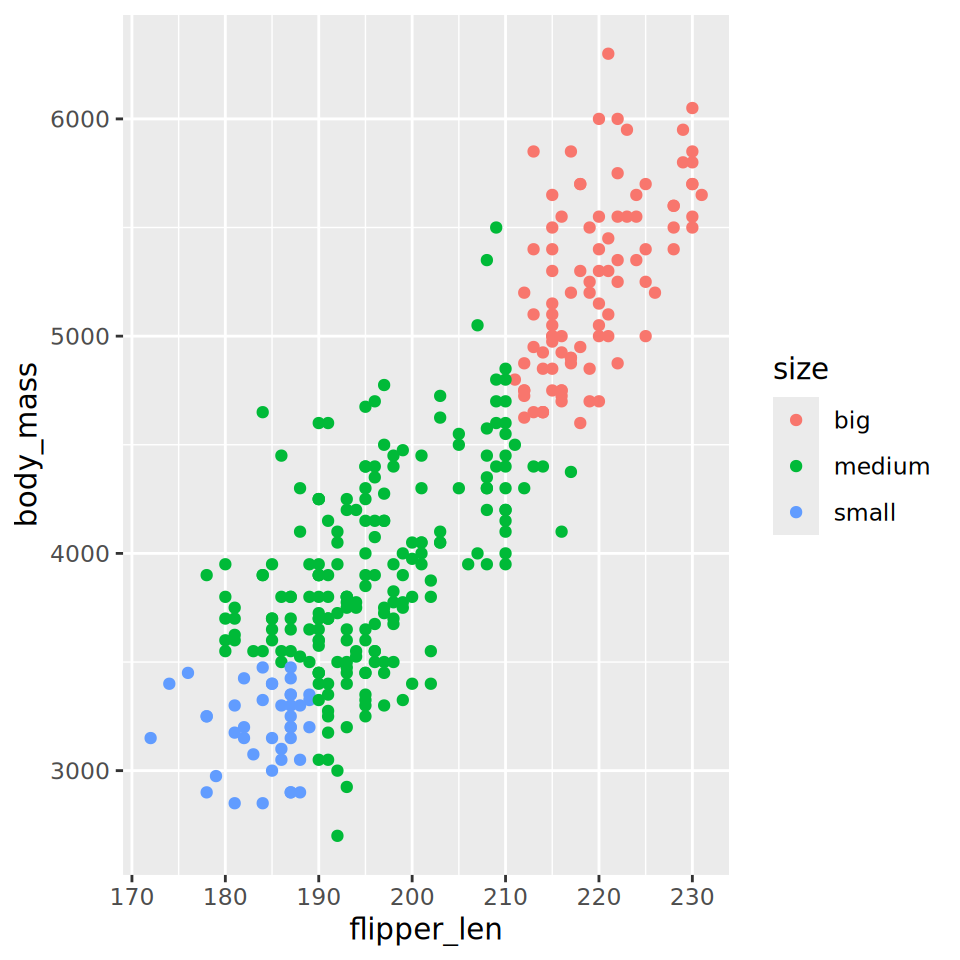
case_when() combines well with ggplot
Use case_when() to define penguins as ‘big’, ‘medium’ or ‘small’ based on two variables (this is arbitrary, you decide how to define these values). Call the new variable “size”.
Recall the code for ggplot, and generate a plot showing the two variables on the x and y axis, with size shown by colour.
Keep variable names short, descriptive, and uniform.
Develop a system and be consistent.
We strongly recommend that all objects and files are named in snake_case.
all_people_like_snake_case
penguins |>rename(f_len = flipper_len) |>head()
  species    island bill_len bill_dep f_len body_mass    sex year
1  Adelie Torgersen     39.1     18.7   181      3750   male 2007
2  Adelie Torgersen     39.5     17.4   186      3800 female 2007
3  Adelie Torgersen     40.3     18.0   195      3250 female 2007
4  Adelie Torgersen       NA       NA    NA        NA   <NA> 2007
5  Adelie Torgersen     36.7     19.3   193      3450 female 2007
6  Adelie Torgersen     39.3     20.6   190      3650   male 2007
group_by()
So far we have calculated summary statistics or arranged our data assuming all our observations are homogeneous, i.e., we have not dealt with sub-groups.
How do we calculate the mean body mass by species, island, or sex?
group_by() allows us to move from computing a single summary statistic to calculating multiple summary statistics.
group_by() is functionally tagging observations with group labels.
Mechanics of group_by()
# Looks the same# Note "Groups: species [3]"penguins |>group_by(species)
# A tibble: 344 × 8
# Groups:   species [3]
   species island    bill_len bill_dep flipper_len body_mass sex     year
   <fct>   <fct>        <dbl>    <dbl>       <int>     <int> <fct>  <int>
 1 Adelie  Torgersen     39.1     18.7         181      3750 male    2007
 2 Adelie  Torgersen     39.5     17.4         186      3800 female  2007
 3 Adelie  Torgersen     40.3     18           195      3250 female  2007
 4 Adelie  Torgersen     NA       NA            NA        NA <NA>    2007
 5 Adelie  Torgersen     36.7     19.3         193      3450 female  2007
 6 Adelie  Torgersen     39.3     20.6         190      3650 male    2007
 7 Adelie  Torgersen     38.9     17.8         181      3625 female  2007
 8 Adelie  Torgersen     39.2     19.6         195      4675 male    2007
 9 Adelie  Torgersen     34.1     18.1         193      3475 <NA>    2007
10 Adelie  Torgersen     42       20.2         190      4250 <NA>    2007
# ℹ 334 more rows
Can group by more than one variable e.g.,group_by(species, island)
Combining group_by() with other functions
group_by() plus another function will cause that function to be applied to individual groups (e.g., returning summary statistics, arranging, or filtering on a per-group basis).