Plotting penguins
This practical aims at performing exploratory plots and how-to build layer by layer to be familiar with the grammar of graphics.
Scatter plots of penguins
The penguins dataset is provided by the palmerpenguins R package. As for every function, most data-sets shipped with a package contain also a useful help page (?).
If not done already, install the package palmerpenguins and load it.
Plot the body mass on the y axis and the bill length on the x axis.
Plot again the body mass on the y axis and the bill length on the x axis, but with colour by species
The geom_smooth() layer can be used to add a trend line. Try to overlay it to your scatter plot.
geom_smooth is using a loess regression by default for < 1,000 points and adds standard error intervals.
- The
methodargument can be used to change the regression to a linear one:method = "lm" - to disable the ribbon of standard errors, set
se = FALSE
Be careful where the aesthetics are located, so the trend linear lines are also colored per species.
Adjust the aesthetics of point in order to
- The
shapemap to the originatedisland - A fixed size of
3 - A transparency of 40%
You should still have only 3 coloured linear trend lines. Otherwise check to which layer your are adding the aesthetic shape. Remember that fixed parameters are to be defined outside aes()
Adjust the colour aesthetic to the ggplot() call to propagate it to both point and regression line.
Try the scale colour viridis for discrete scale (scale_colour_viridis_d()). Try to change the default theme to theme_bw()
Find a way to produce the following plot:
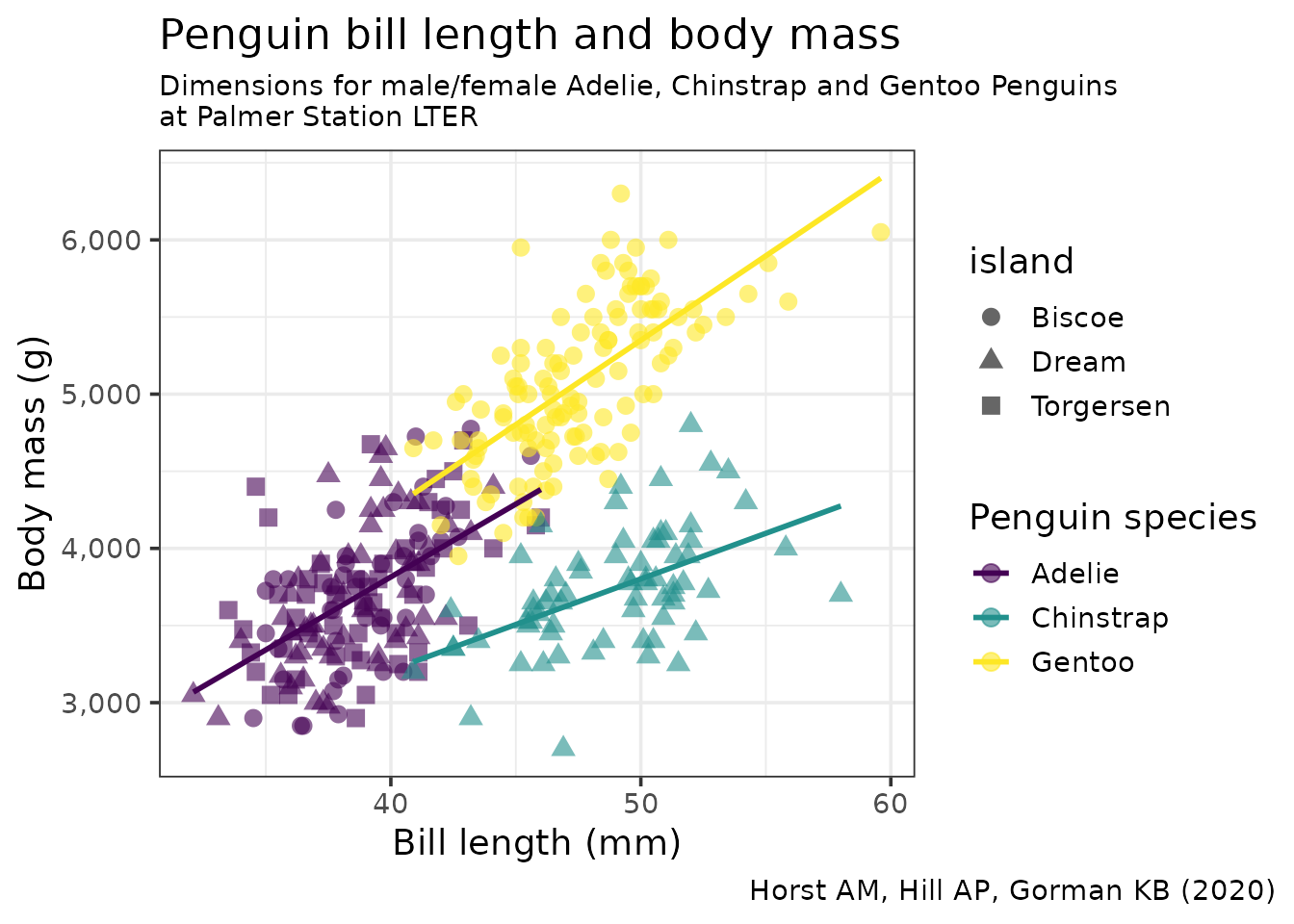
- All aesthetics defined in the
ggplot(aes())command will be inherited by all following layers aes()of individual geoms are specific (and overwrite the global definition if present).labs()controls of plot annotationstheme()allows to tweak the plot liketheme(plot.caption = element_text(face = "italic"))to render in italic the caption
Exact reproduction
The order of the legend has changed since the versions of ggplot2 used for the creation of the image.