Trends

Line charts

Roland Krause

MADS6

Monday, 2 December 2024

Session aims

Learning objectives

  • How to draw trends with smoothing
  • Direct labeling for lines

Good plotting practice

Slowly moving towards production.

Brazil rain forest

Previously considered Brazil loss data as categorical

brazil_url <- "https://raw.githubusercontent.com/rfordatascience/tidytuesday/master/data/2021/2021-04-06/brazil_loss.csv"
brazil_loss <- read_csv(brazil_url, 
                        col_select = -c(entity, code),
                        col_types = list(year = col_character()))

pivot_longer(brazil_loss,
           cols = commercial_crops:small_scale_clearing,
           names_to = "reasons",
           values_to = "area_ha") -> brazil_loss_long_complete

(brazil_loss_long_complete |> 
    filter(year == 2003)  -> brazil_loss_long)
# A tibble: 11 × 3
   year  reasons                         area_ha
   <chr> <chr>                             <dbl>
 1 2003  commercial_crops                 550000
 2 2003  flooding_due_to_dams                  0
 3 2003  natural_disturbances              35000
 4 2003  pasture                         2761000
 5 2003  selective_logging                149000
 6 2003  fire                              44000
 7 2003  mining                                0
 8 2003  other_infrastructure               9000
 9 2003  roads                             35000
10 2003  tree_plantations_including_palm   26000
11 2003  small_scale_clearing             358000

Caution

Is this really a time series?

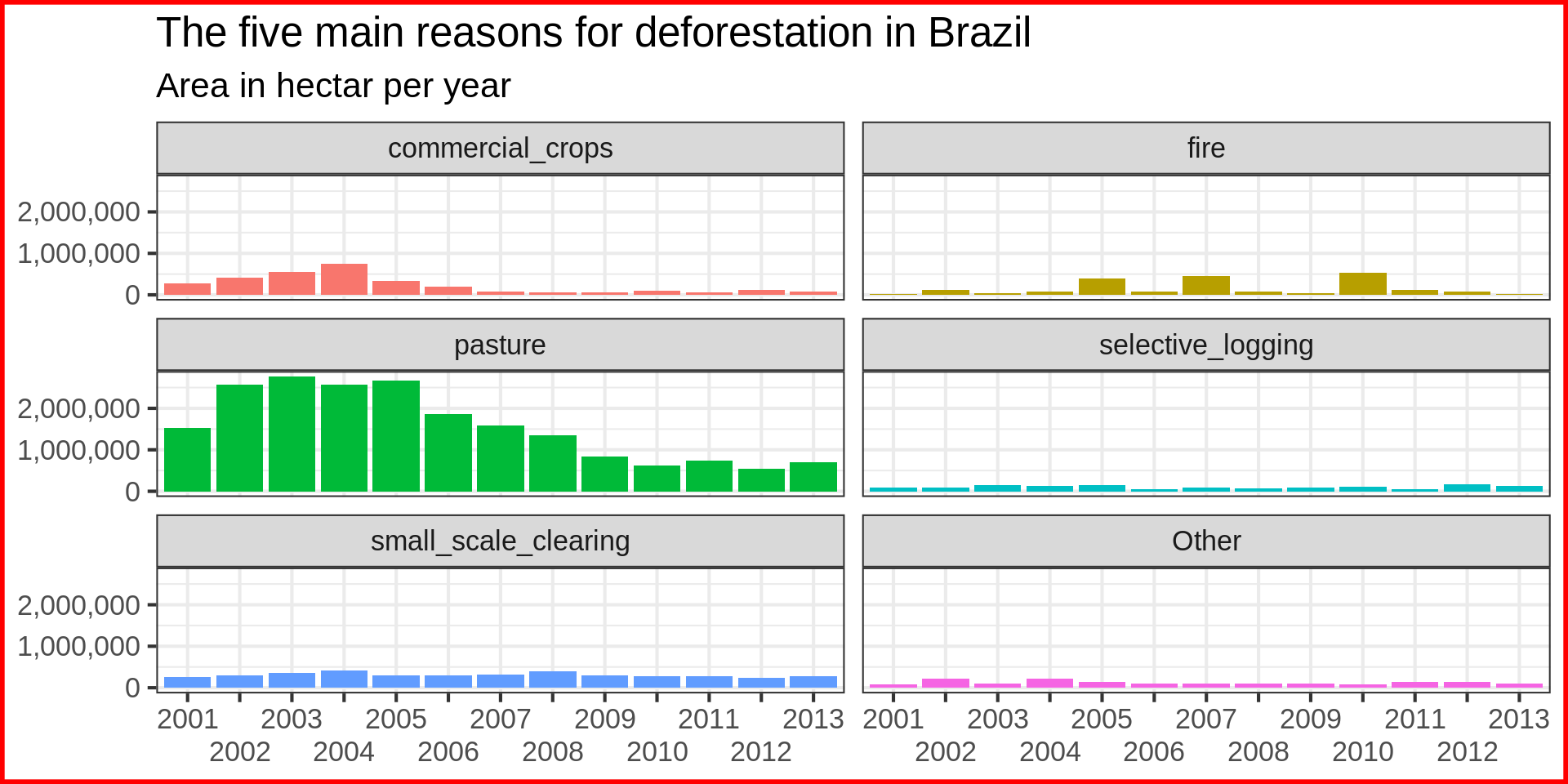
Small multiple plot with years as category

brazil_loss_long_complete |>
  ggplot(aes(x = year, y = area_ha, 
             fill = fct_lump(reasons, n = 5, w = area_ha))) +
  geom_col() +
  labs(title = "The five main reasons for deforestation in Brazil",
       subtitle = "Area in hectar per year",
       fill = NULL,
       x = NULL,
       y = NULL) +
  facet_wrap(vars(fct_lump(reasons, n = 5, w = area_ha)), nrow = 3) +
  theme(legend.position = "none")  +
  guides(x = guide_axis(n.dodge = 2)) +
  scale_y_continuous(labels = scales::comma) +
  theme(plot.background = element_rect(colour = "red", linewidth = 2))

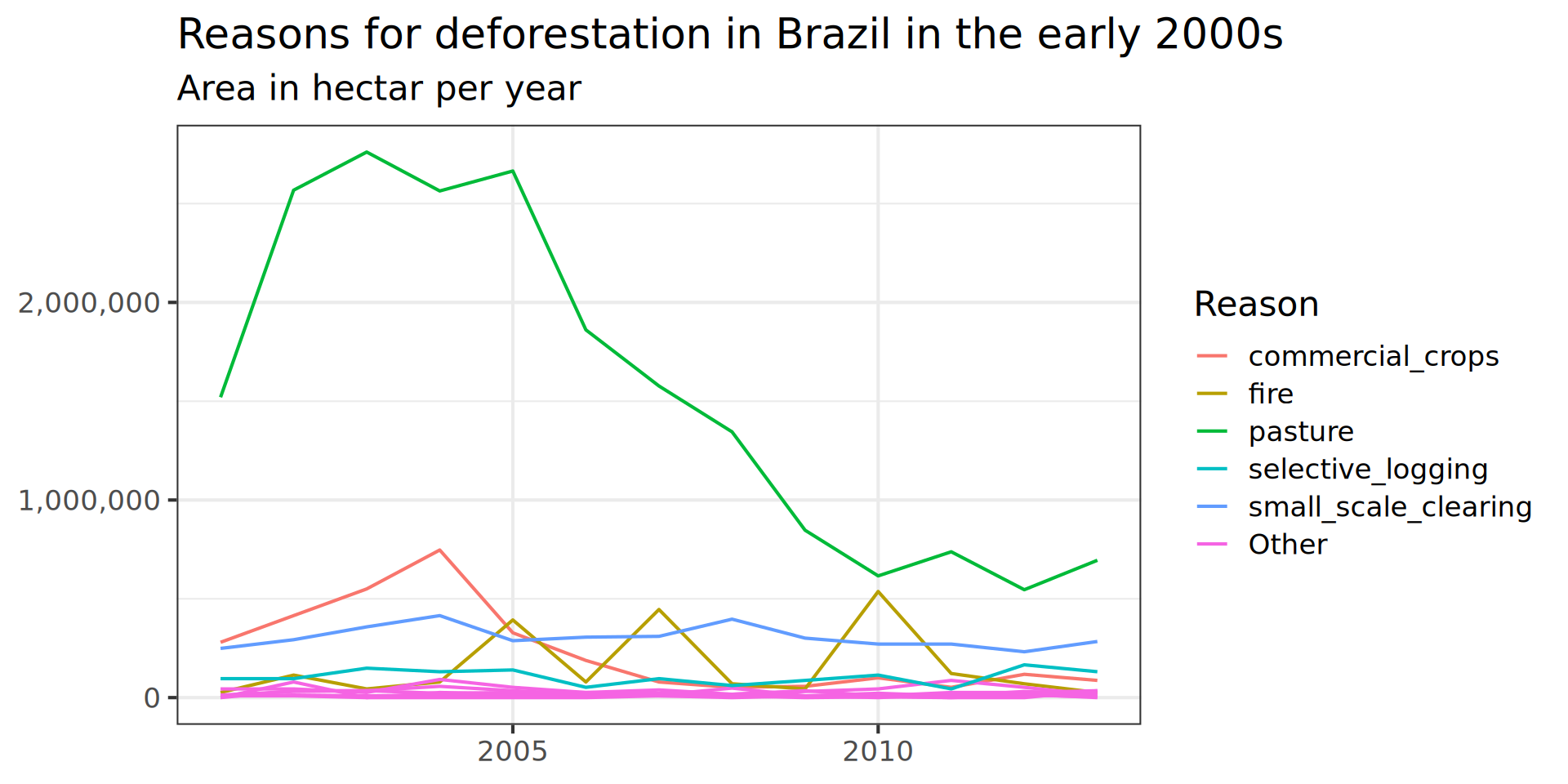
Time data should be lines

Code
brazil_loss_long_complete |>
  ggplot(aes(x = as.factor(year), y = area_ha, colour = reasons)) + 
  
#             fill = fct_lump(reasons, n = 5, w = area_ha))) +
  geom_line(aes( group = reasons)) +
  labs(title = "Reasons for deforestation in Brazil in the early 2000s",
       subtitle = "Area in hectar per year",
       fill = NULL,
       x = NULL,
       y = NULL) +
  #vars(fct_lump(reasons, n = 5, w = area_ha))
  facet_wrap(vars(reasons), scales = "free_y") +
  theme(legend.position = "none",
        axis.text = )  +
   scale_x_discrete(
    breaks = seq(from = 2000, to = 2015, by = 5)) +
  scale_y_continuous(labels = scales::comma) +
  theme(base_size = 6)
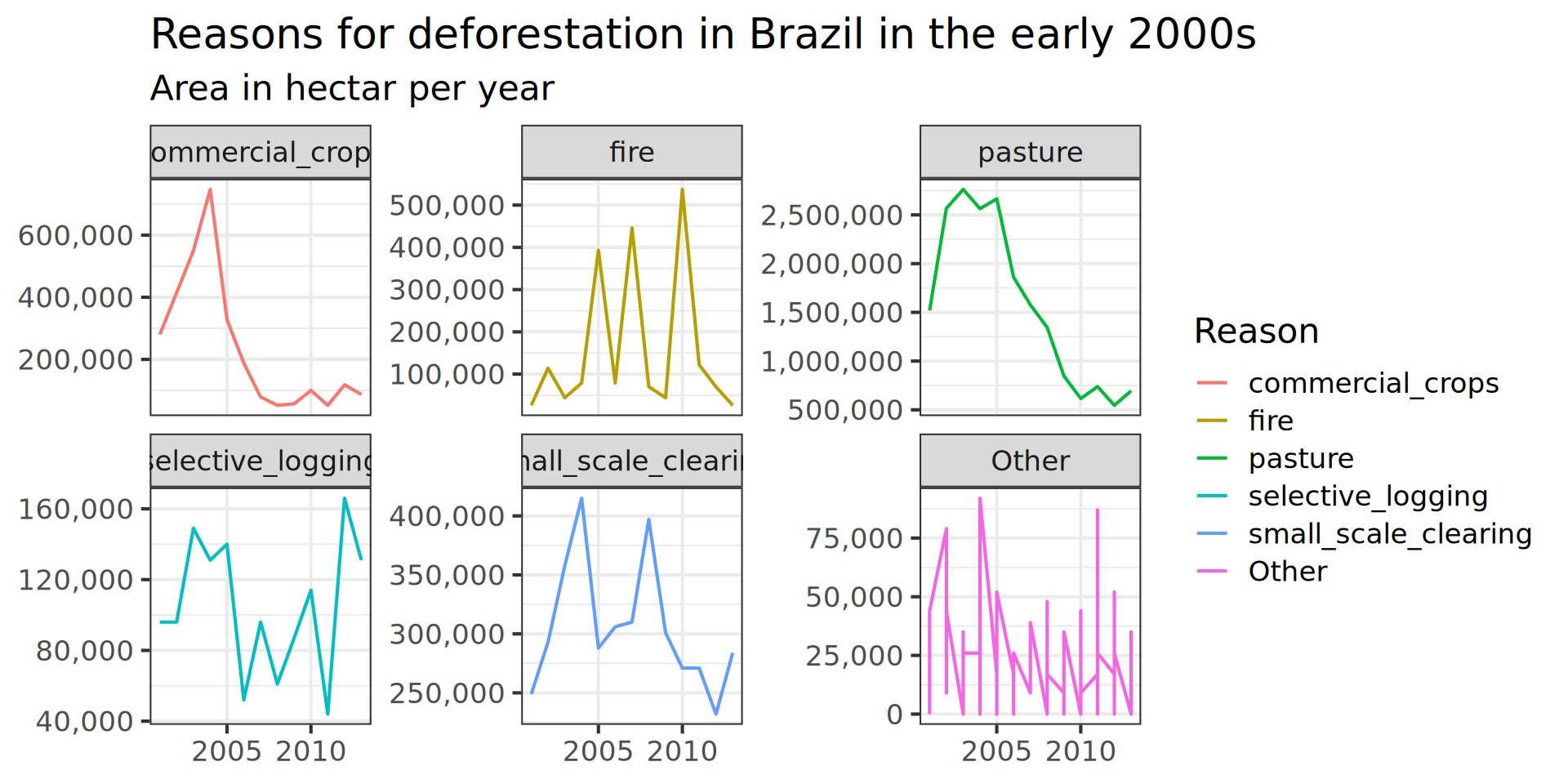
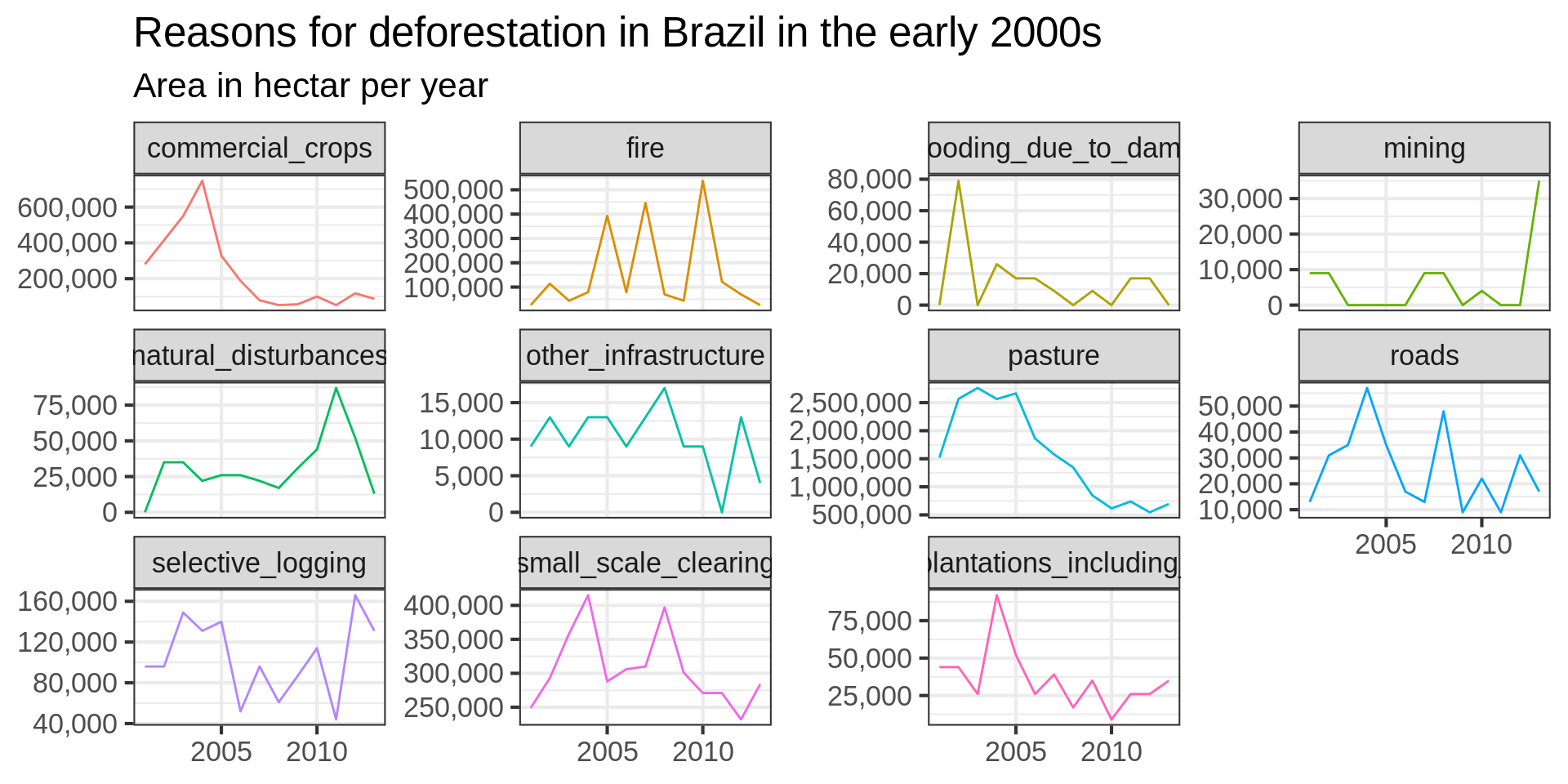
Labels are posing a problem with small multiple plots.

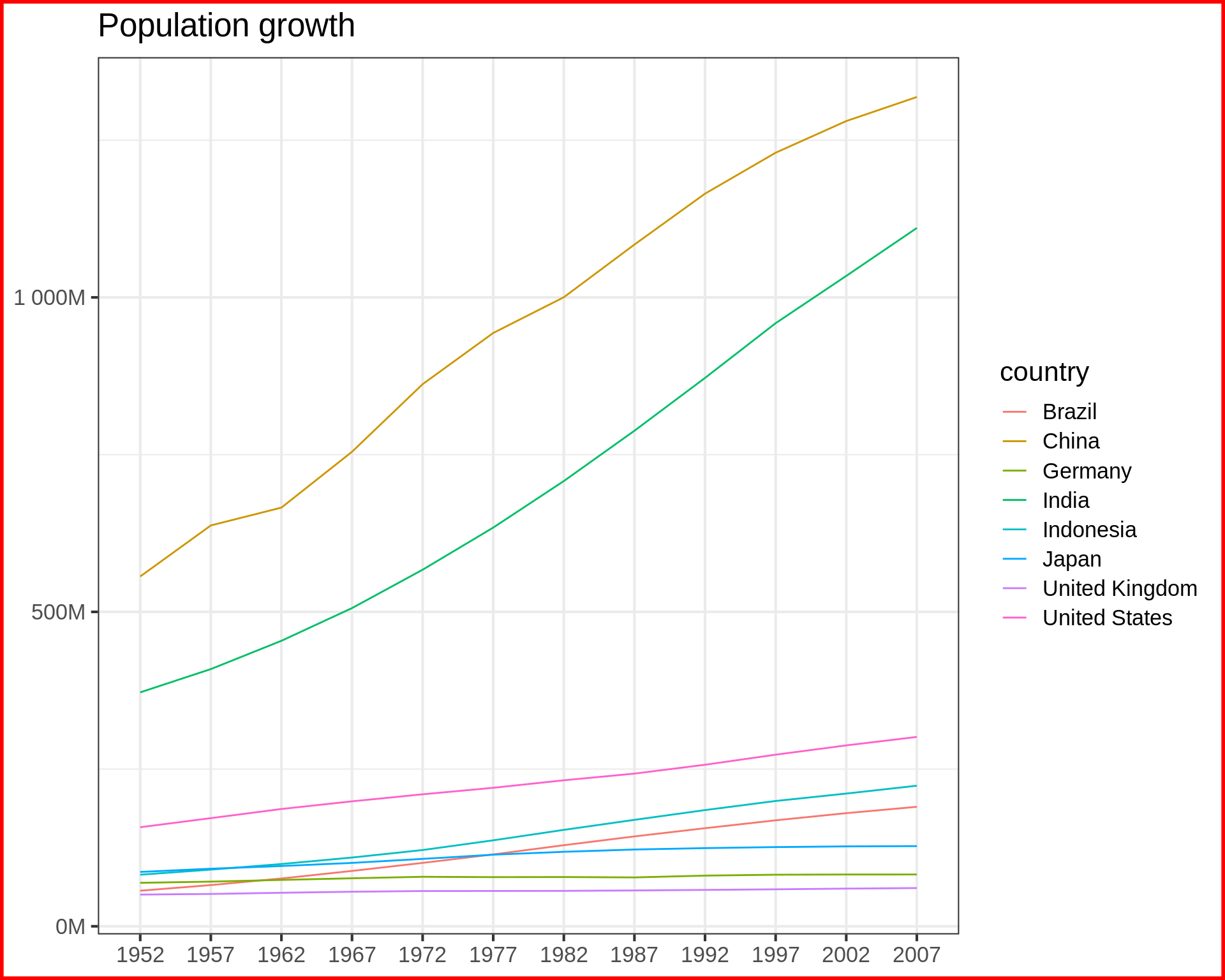
Basic line chart

Code
gapminder |> 
  # filtering self-join for countries with 
  # more than 50M people in 1952
  semi_join(gapminder |> 
               filter(year == 1952, 
                      pop > 50000000) |> 
            select(country), join_by(country)) -> 
              gapminder_large
              
  gapminder_large |>
ggplot(aes(x = as.factor(year), y= pop, colour = country, group = country)) +
  geom_line() +
  labs(title = "Population growth", 
       y = NULL, x = NULL) +
  theme(plot.background = element_rect(colour = "red", linewidth = 2)) +
  scale_y_continuous(labels = label_number(suffix = "M", scale = 1e-6)) ->
  def
def

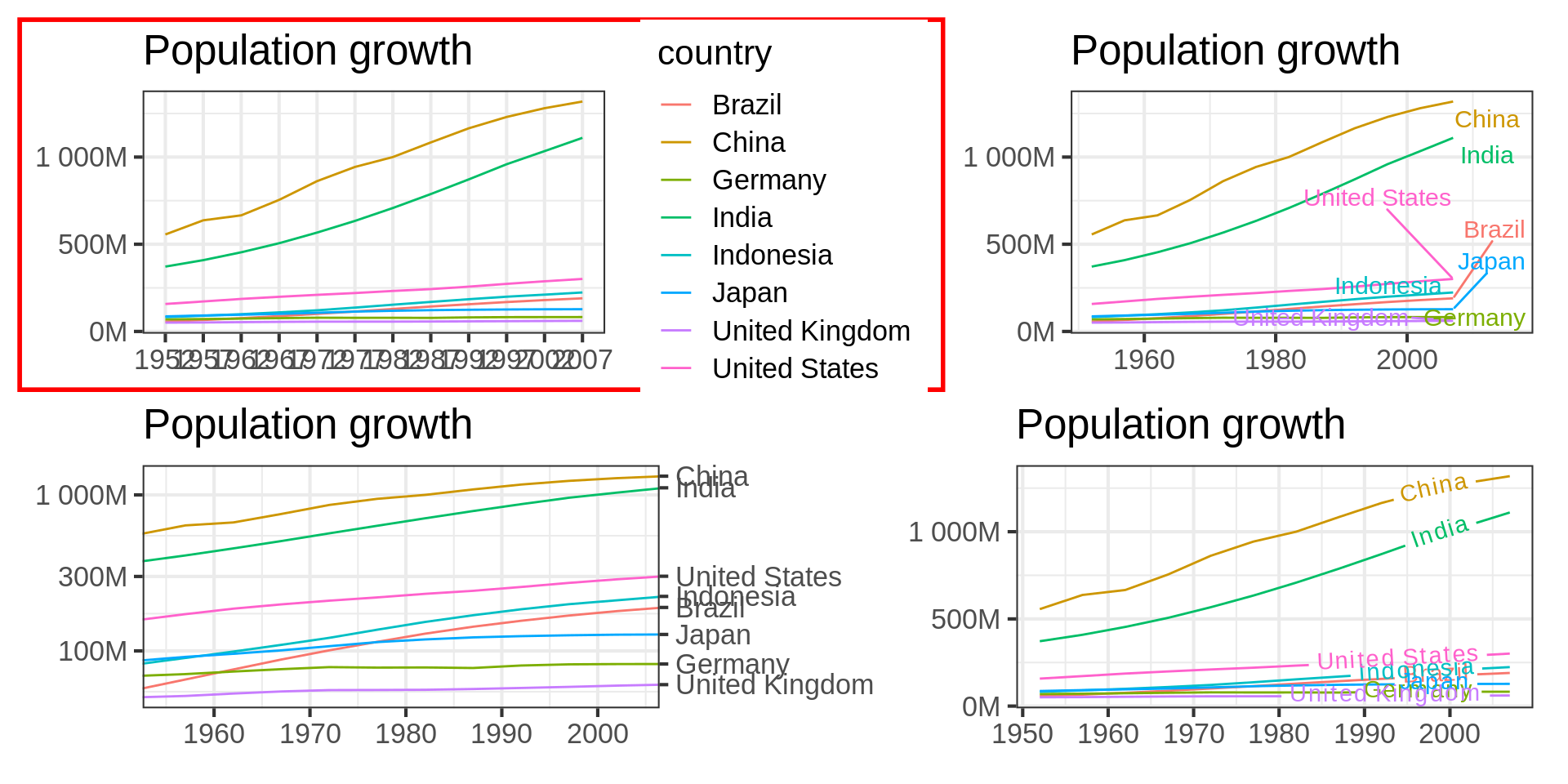
Confusing for audience

Extra effort to read the legend.

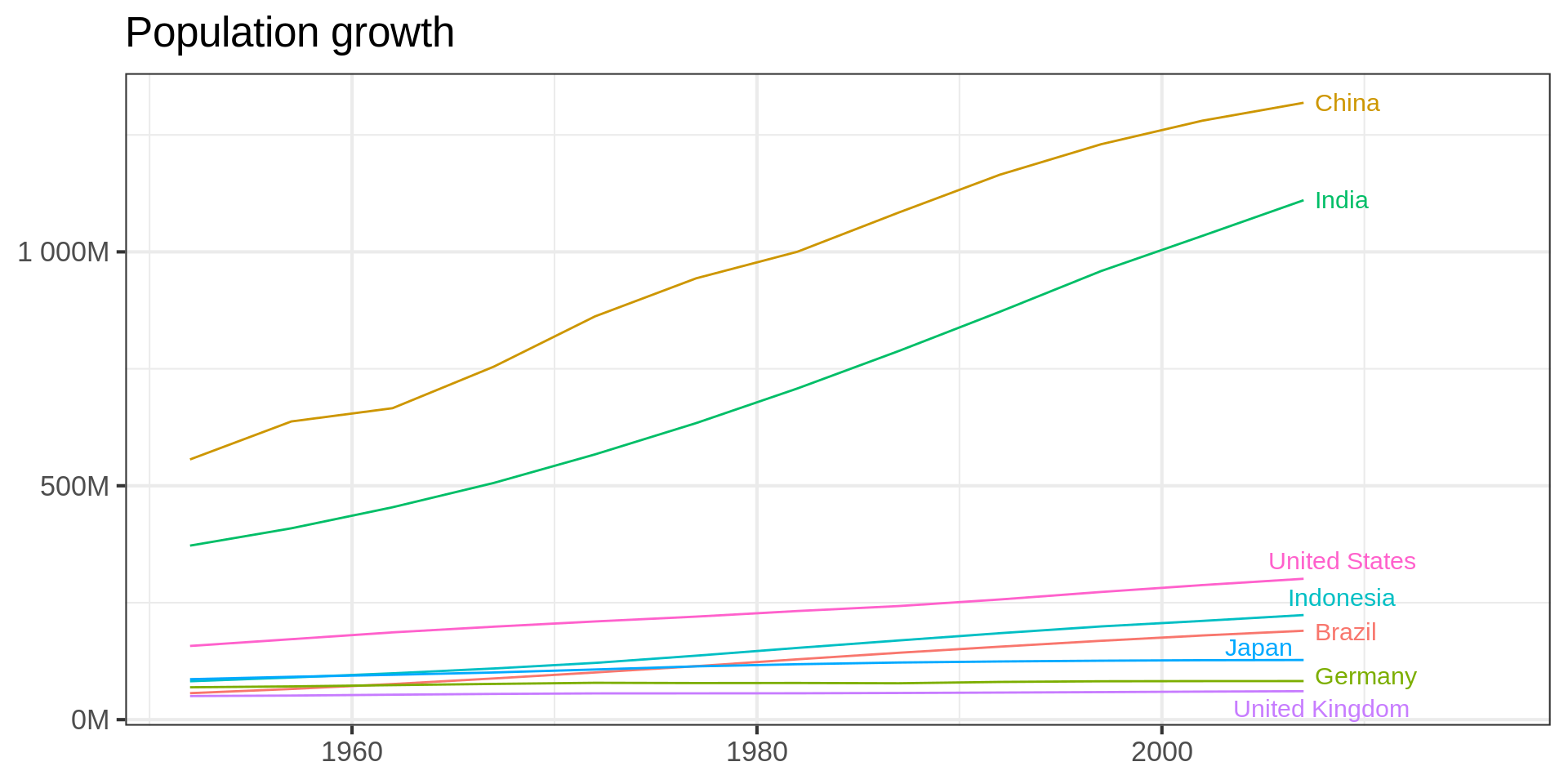
Direct labeling using ggrepel

Code
library(ggrepel)
gapminder_large |> 
  # for creating labels
  mutate(country_label = if_else(year == max(year), country, NA_character_ )) |> 
  ggplot(aes(x = year, y= pop, colour = country, group = country)) +
  geom_line() +
  geom_text_repel(aes(label = country_label) , nudge_x = 0.35, size = 4) +
  theme(legend.position = "none") +
    scale_y_continuous(labels = label_number(suffix = "M", scale = 1e-6)) +
  # space for plot, not ideal solution
  coord_cartesian(xlim = c(1952, 2016)) +
  labs(title = "Population growth",
    x = NULL,
      y = NULL) ->
  ggrep

ggrep

ggrepel working OK but not ideal.

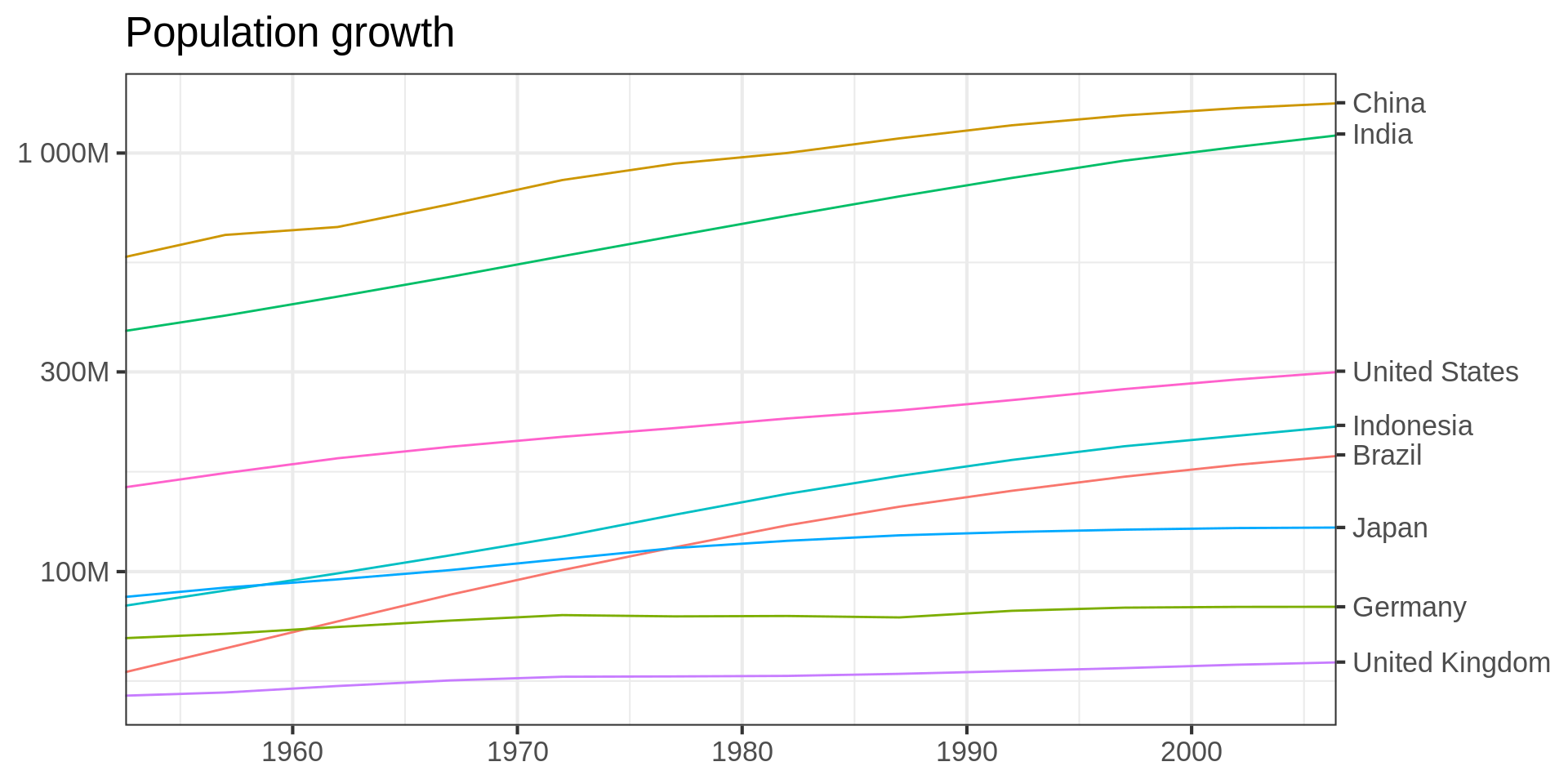
Using a secondary axis

Code
# filtering self-join for countries with 
# less than 10M people in 1952

gapminder_label <-
  semi_join(gapminder,
            gapminder |>
              filter(year == 1952,
                     pop > 50000000),
            join_by(country)) |>
  filter(year == max(year))

gapminder_large |>
  semi_join(gapminder_label, join_by(country)) |>
  ggplot(aes(
    x = year,
    y = pop,
    colour = country,
    group = country
  )) +
  geom_line() +
  theme(legend.position = "none") +
  scale_y_continuous(
    labels = label_number(suffix = "M", scale = 1e-6),
    sec.axis = dup_axis(
      breaks = gapminder_label$pop,
      labels = gapminder_label$country,
      name = NULL
    ),
    trans = "log10"
  ) +
  labs(title = "Population growth",
    x = NULL,
       y = NULL, ) +  
 coord_cartesian(xlim = c(1955, 2004)) ->
  sea

sea

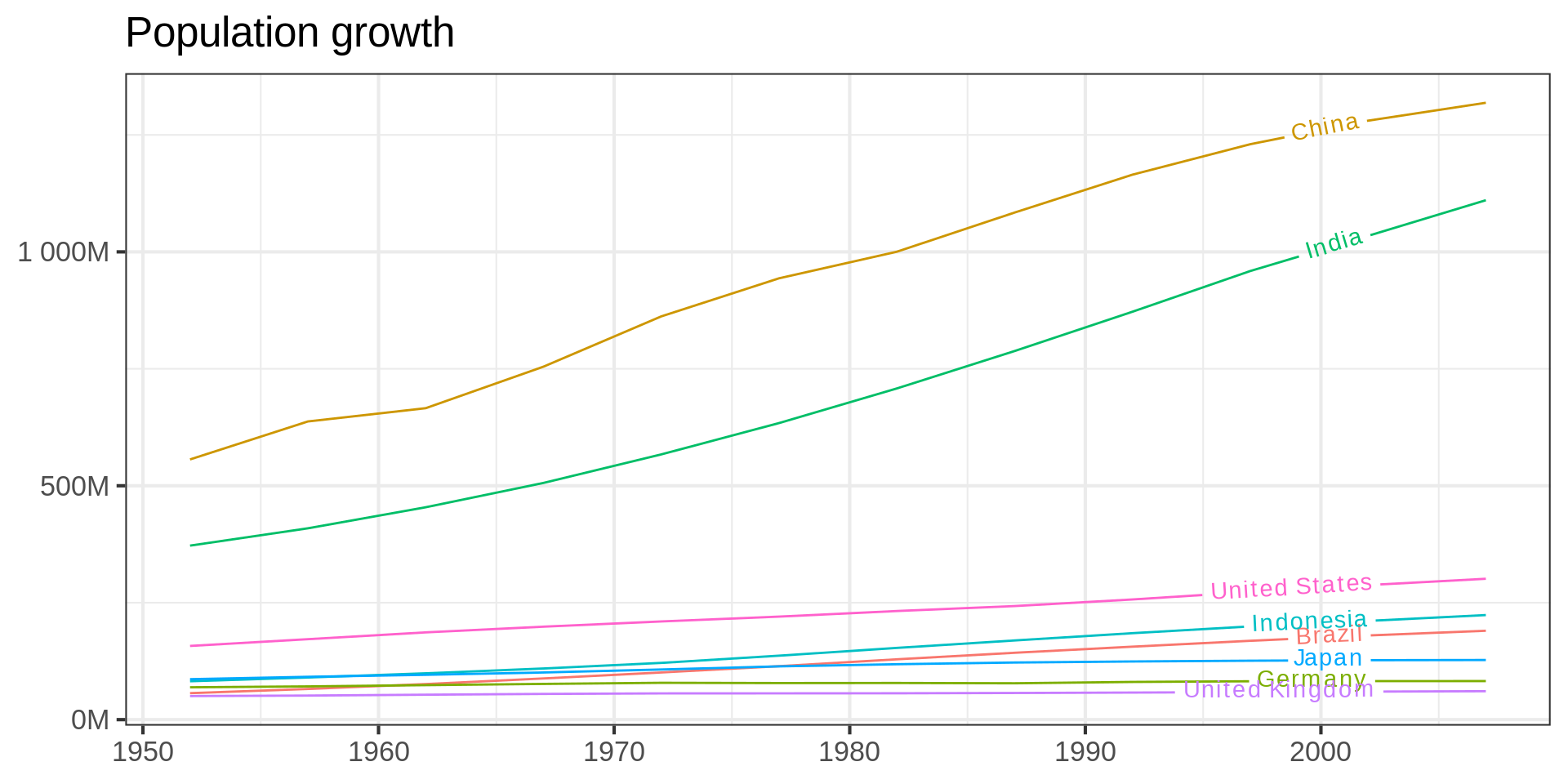
Direct labeling with geomtextpath

Code
library(geomtextpath)

gapminder |>
  semi_join(gapminder_label, join_by(country)) |>
  ggplot(aes(
    x = year,
    y = pop,
    colour = country,
    group = country
  )) +
  geom_textpath(aes(label = country), 
                # label at 90% of line
                hjust= 0.9) + 
    scale_y_continuous(labels = label_number(suffix = "M", scale = 1e-6)) +
  theme(legend.position = "none") +
  labs(title = "Population growth",
    x = NULL,
      y = NULL) -> 
  gtp 

gtp

Summary

Time series

Basics

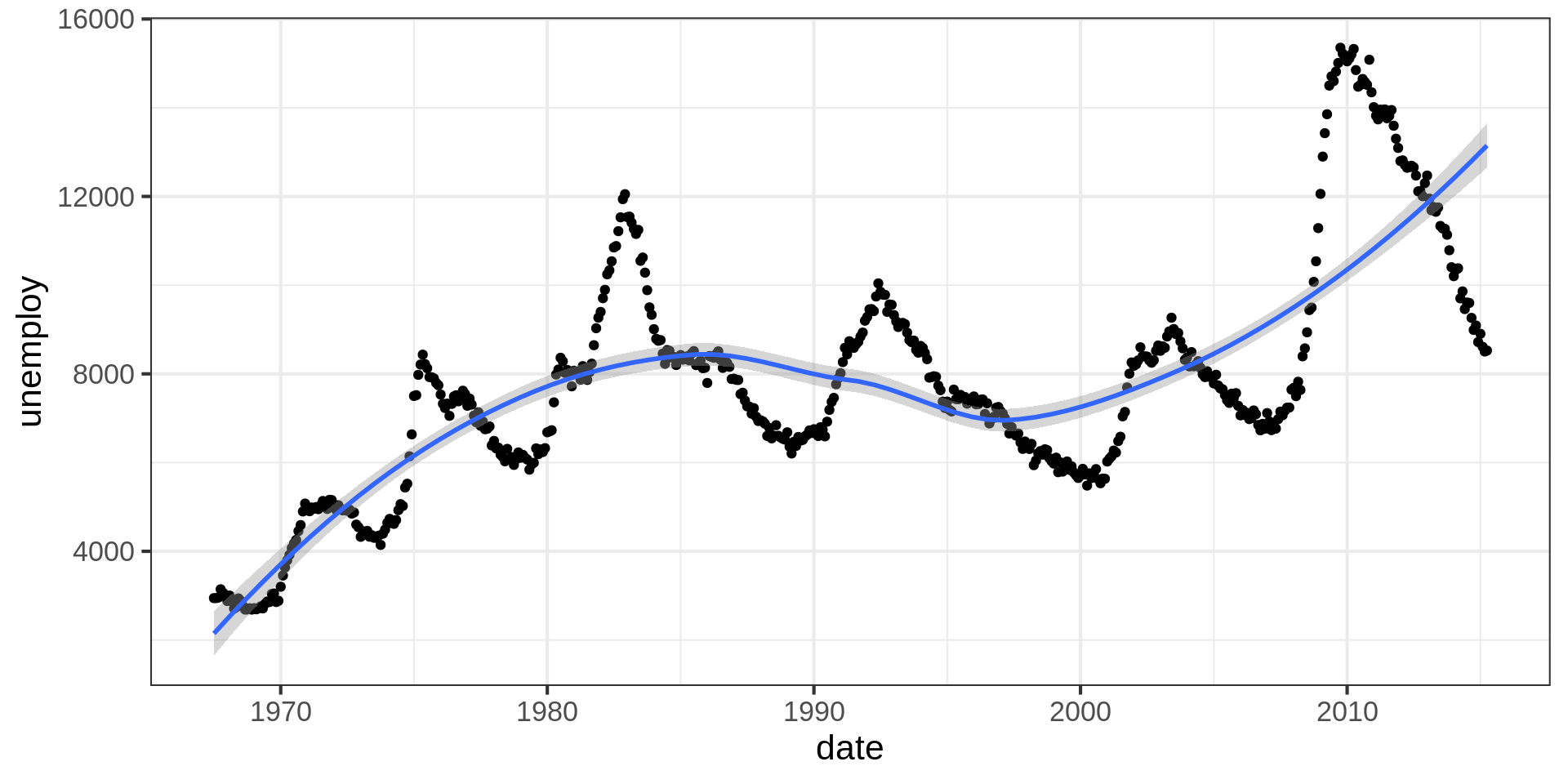
Unemployment rate in the US

ggplot(economics) +
  aes(x = date, y = unemploy) +
  geom_point() +
  geom_smooth()

Connecting times with lines

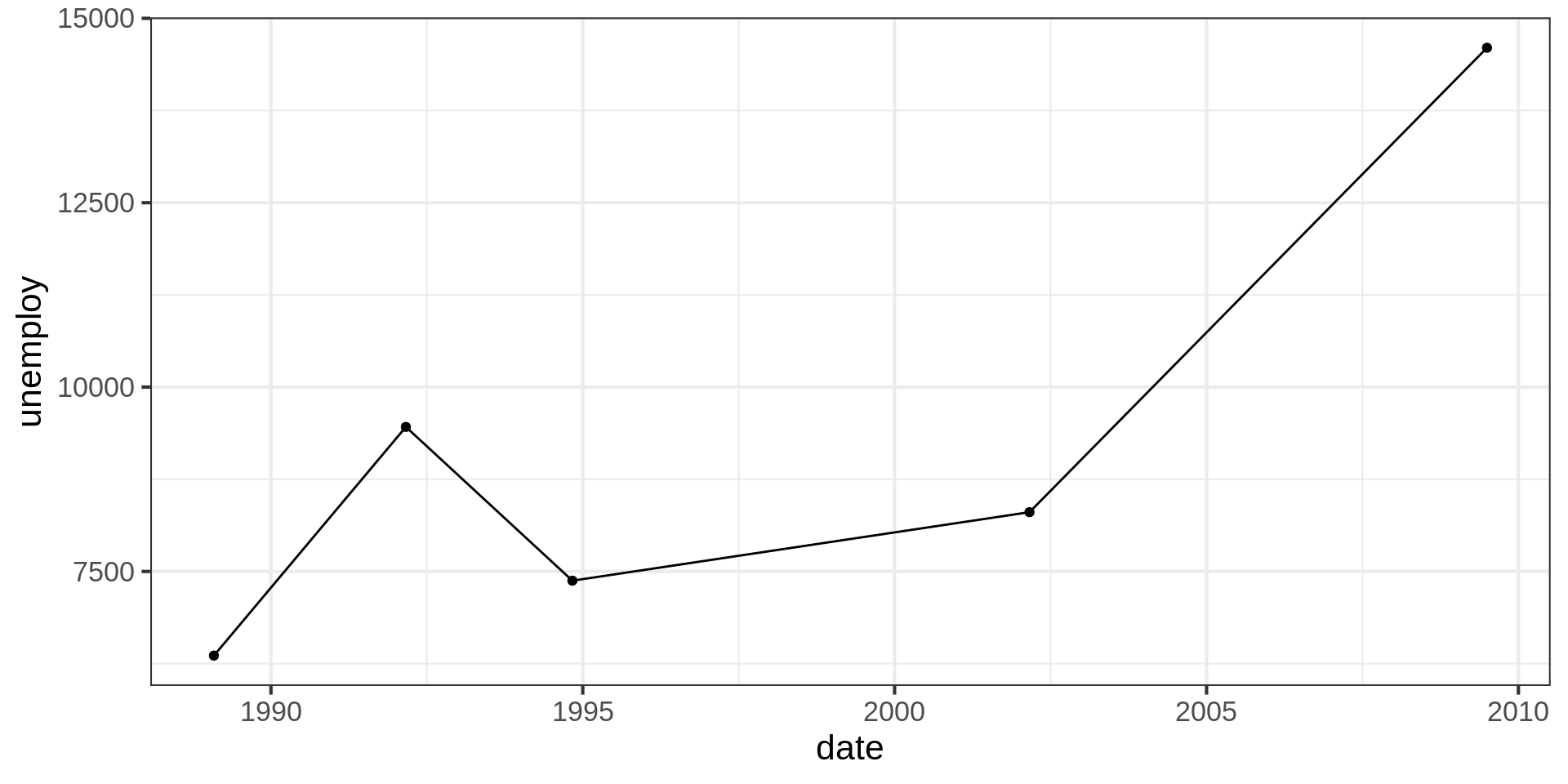
Subsampling economics

ggplot(economics  |> 
         slice_sample(n = 5)) +
  aes(x = date, y = unemploy) +
  geom_point() +
  geom_line()

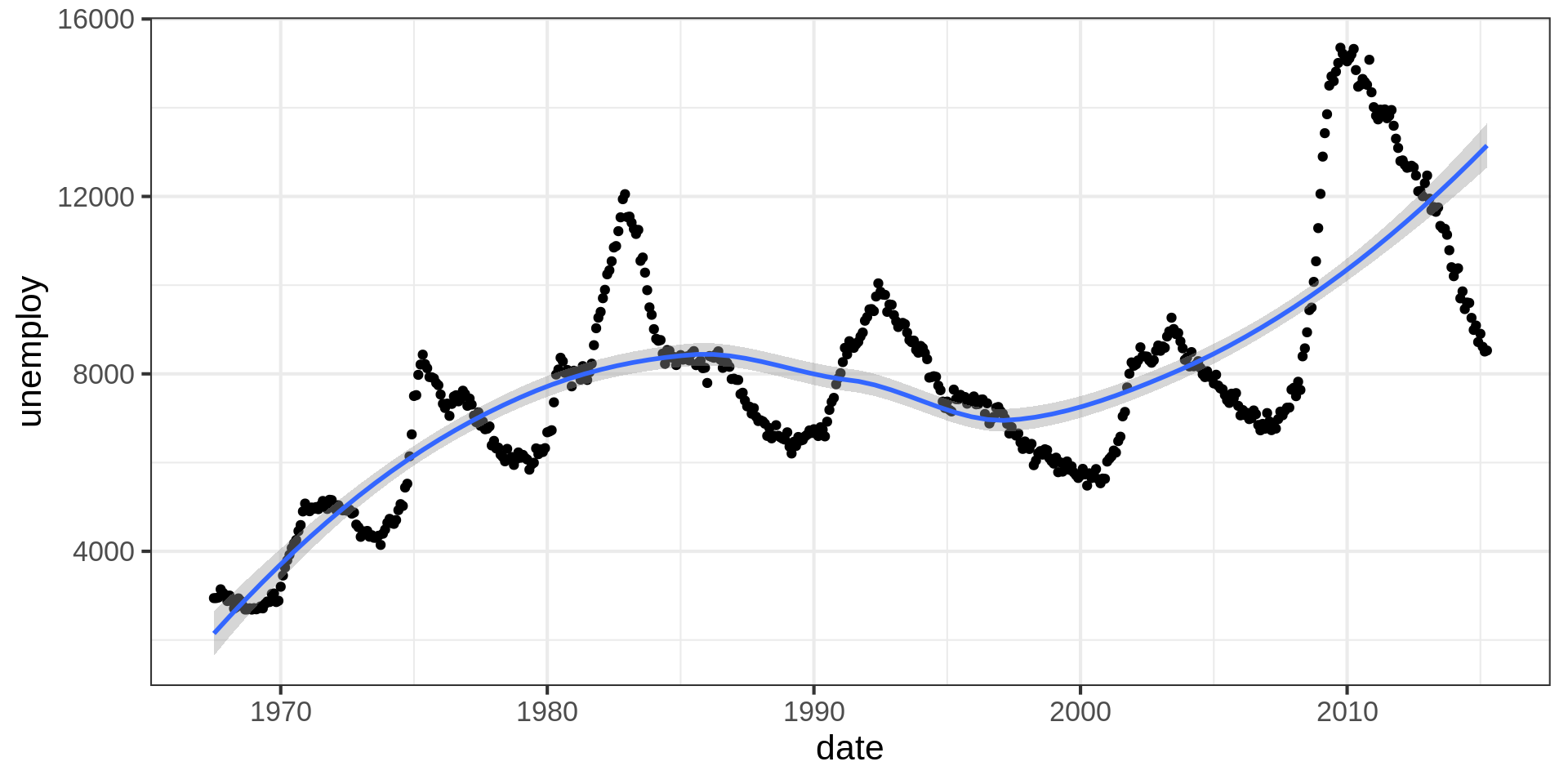
LOESS smoothing

ggplot(economics) +
  aes(x = date, y = unemploy) +
  geom_point() +
  geom_smooth(method = "loess", formula = y ~ x)

Locally estimated scatterplot

Standard in ggplot2, computationally expensive

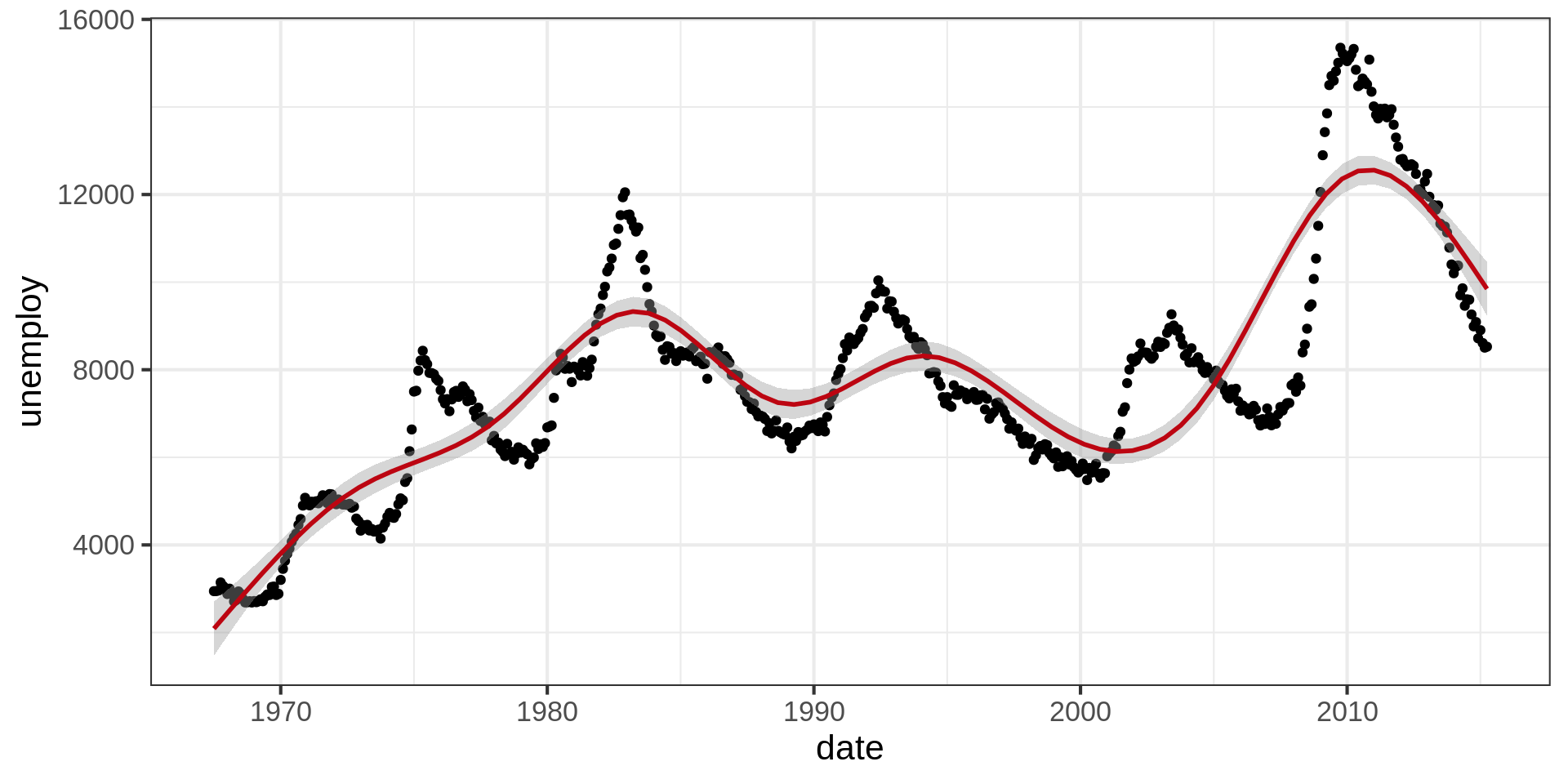
Using gam smoothing

ggplot(economics) +
  aes(x = date, y = unemploy) +
  geom_point() +
  geom_smooth(method = "gam", colour = "#BC0511"
                )

Alternative

Generalized additive models with integrated smoothness estimation

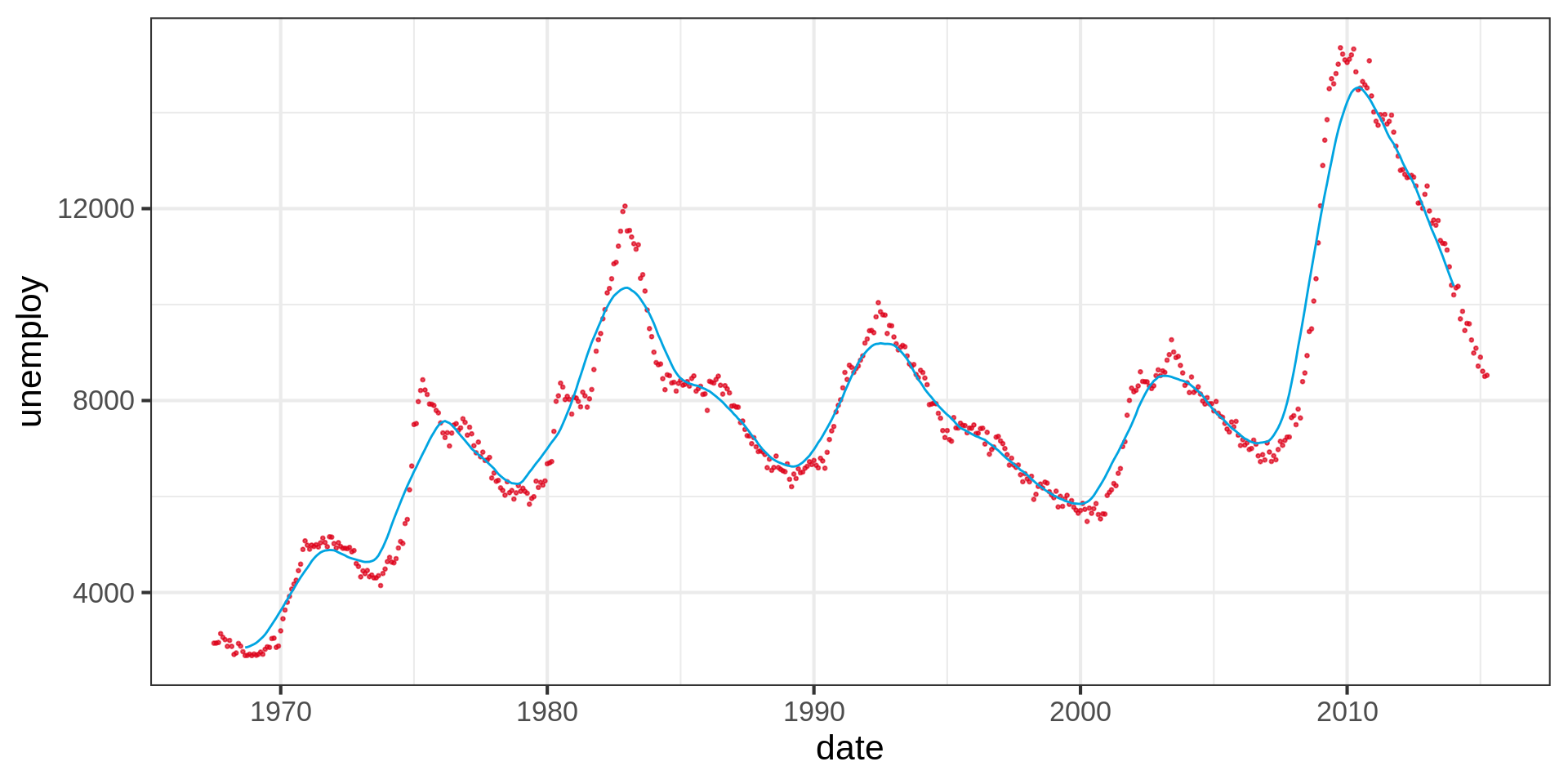
Moving average

Code
economics |> 
  # Rolling average of 30 measurements before and after
  mutate(unemploy_ma = stats::filter(unemploy, rep(1/30,30), sides =2)) |> 
  relocate(unemploy_ma) |> 
  ggplot() +
  geom_point(aes(x = date, y = unemploy), color = "#DC021B", size = 0.5, alpha = 0.7) +
  geom_line(aes(x = date, y = unemploy_ma), colour = "#00a4e1")

Thank you for your attention!

gapminder_label <-
  semi_join(gapminder,
            gapminder |>
              filter(year == 1952,
                     pop > 90000000),
            join_by(country)) |>
  filter(year == max(year))

gapminder_large |>
  semi_join(gapminder_label, join_by(country)) |>
  ggplot(aes(
    x = year,
    y = pop,
    colour = country,
    group = country
  )) +
  geom_line(linewidth = 7, show.legend = FALSE) +
  scale_y_continuous(trans = "log10"  ) +
  labs(title = NULL,
    x = NULL,
       y = NULL ) +  
  theme(legend.position = "none") +
  coord_cartesian(xlim = c(1955, 2004)) + 
  theme_void() 
   ggsave("../img/logo_trends.png")